
ETC Support Site Search Tips
Introduction
Below are tips on utilizing search on ETC's Support Site, a.k.a. KMS (Knowledge Management System). The search simply matches words from the query with article titles and content, which then serves up a list of articles that best matches the query.
Search Tips
- Avoid queries that are too broad, such as those containing only one or two words (i.e. Eos console, Paradigm, CEM, etc.).
- When search queries include an ETC model name, use the official name found in the product's data sheets, including the use and placement of hyphens. The search is strictly literal and variations on model names are not synonymous.
- For example: the official model name of a currently shipping Paradigm 7" touchscreen is P-TS7, not PTS7, PTS-7, or other.
- You can filter the query to specific categories/products by using the filters on the left side of the page. Upon clicking a filter it automatically re-searches narrowing the results to that specific scope.
- Click the arrow next to Location, then begin clicking on the desired categories. It always starts at the top of the site and each filter narrows the list. For example, a good filter for the query in the screenshot below may be ETC > Consoles > Eos.
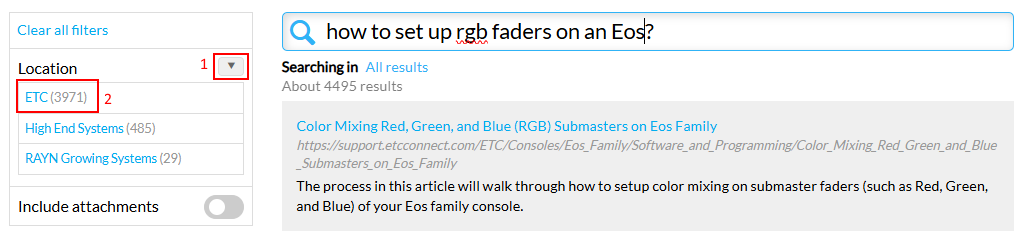
- NOTE: depending on the size of your browser window the filters will either be to the left of or above the list of results.
- Click the arrow next to Location, then begin clicking on the desired categories. It always starts at the top of the site and each filter narrows the list. For example, a good filter for the query in the screenshot below may be ETC > Consoles > Eos.
- Attachments (such as PDFs) are not included in search by default. Their inclusion can be toggled on after running an initial search, which then re-runs the same query and may alter the the list of results.
- Click the toggle next to "Include attachments" then uncheck any attachment types you do not want included.
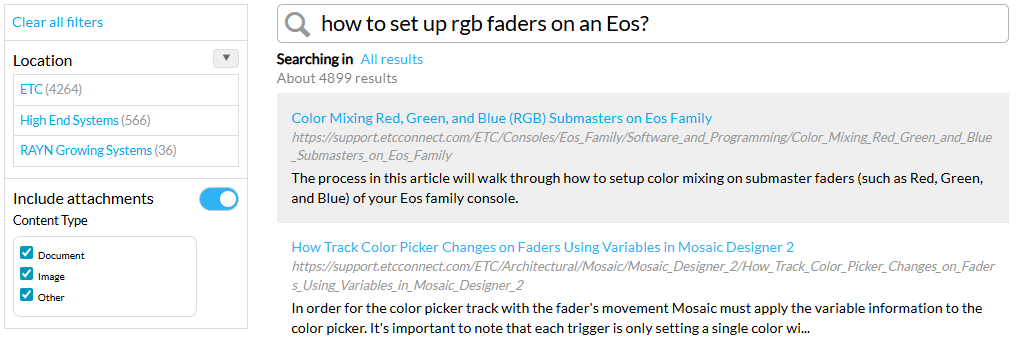
- Click the toggle next to "Include attachments" then uncheck any attachment types you do not want included.
- Searches initially display 11 results, but the best result may be further down the list. This largely depends on how broad or specific the query is. Click "Show more results" at the bottom of the list to expand the results.
- If the desired information is not found within the first few pages the query either needs to be reformulated or the answer may not yet exist on the KMS.
Still can't find what you're looking for?
If you still can't find the information that you're looking for, it's possible that content may not currently exist on the Support Site. Some questions may be answered by checking the product's data sheet, user manual, setup guide, installation guide, or other documentation on ETC's primary website. ETC Support Agents are regularly adding to our support site, but you can always report issues finding content, or offer suggestions for new content by emailing us at kmsfeedback@etcconnect.com. Please note if you need an immediate answer to your question reaching out to ETC Technical Support is the most rapid option available.