
Configuring a Sensor Portable Pack for Single Phase Operation
Overview
Sensor SP6 and SP12 portable packs can be configured for either three-phase or single-phase (also called biphase or split-phase) operation by adjusting two internal copper bus straps. (and possibly re-configuring the control module, depending on type). To adjust SP6/12 frame packs for single phase operation:
Only SP6 and SP12 portable packs can be changed between three-phase and single-phase operation in the field. Some other types of Sensor racks, including larger touring racks and installation racks, can be ordered in three-phase and single-phase variants, but they are permanently locked to their factory phasing and it cannot be altered in the field.

Conversion Procedure
To convert a Sensor SP6 or SP12 portable pack from three-phase to single-phase operation, follow these steps:
- Disconnect power from all camlock input connectors.
- Remove all dimmer modules from the portable pack, exposing the bus bars and connectors.
- Remove the screws at both ends of the 2"-long copper bars that connect the phase B connector to the phase B bus bar. Loosen the screws at the left end of the bars.
- Use the top bar to connect the phase A connector to the phase B connector, as shown below.
- Use the bottom bar to connect the phase B connector to the phase C connector, as shown below.
- Tighten all screws to 40 inch-pounds of torque.
- Replace dimmer modules.
- Connect power to the phase A and phase C camlocks. Do not connect power to the phase B camlock.
-
- For a CEM+, you will need to generate defaults for a single phase configuration.
- CEM3, Sensor (classic) and MPE automatically detect single phase operation, so no additional configuration is necessary.
| Phasing | SP6 diagram | SP12 diagram |
|---|---|---|
| Three-phase operation | 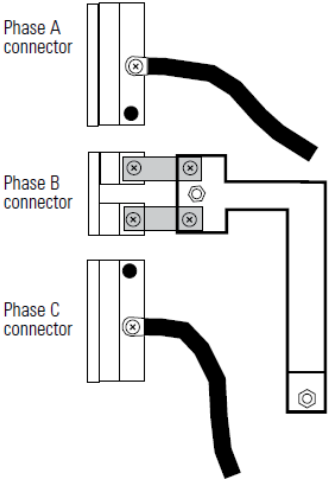 |
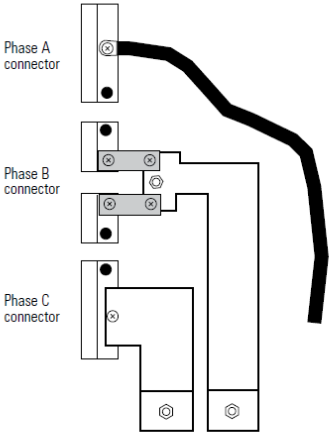 |
| Single-phase operation | 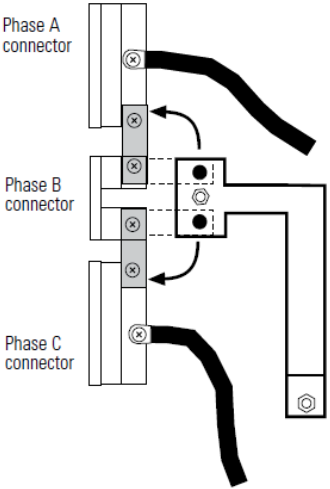 |
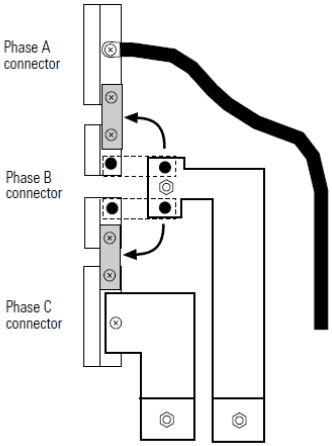 |