DMX Port Designation on Mosaic Show Controllers MSC
What are the DMX port designations on Mosaic Show Controllers?
MSC 1, MSC 2, and MSC 4 are all the same form factor, with two DMX output terminals on the top right.
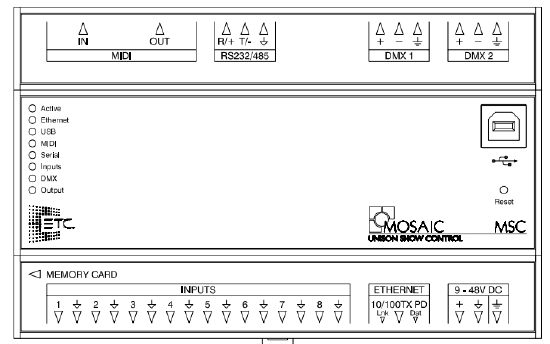
The output designations are hard-locked depending on the kind of controller you have.
MSC 1 Outputs
Hard line DMX 2 on an MSC 1 outputs the same patch as DMX 1. The MSC 1 is still limited to 512 unique channels of control. DMX 2 is not exposed within Mosaic Designer so there is no special setup required if you need a second optically isolated port of DMX. Simply patch DMX port 1 and the same patch will be replicated on DMX port 2.
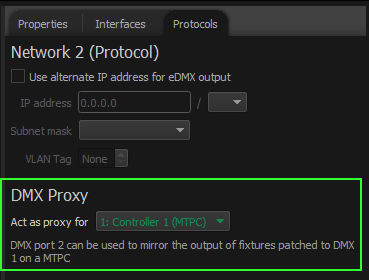
In the circumstance of a Mosaic system with an MSC 1 and an MTPC, DMX Proxy is available to the MSC 1 to mirror the output of the MTPC. This setting is changed in Mosaic Designer's Network tab.
MSC 2 and MSC 4 Outputs
Hard line DMX 1 and DMX 2 are Universe 1 and 2 respectively.
DMX Input
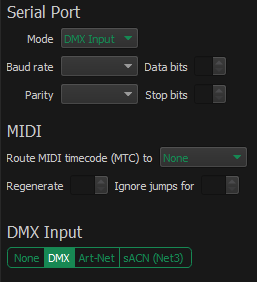
The MSC1, 2, and 4 have a RS-232/485 port that can be changed to function as a DMX input port. In Mosaic Designer select the MSC, and on the Interfaces tab change the Serial Port Mode to DMX Input. NOTE: when the MSC is configured this way, it is not able to using sACN or Art-Net as DMX input for triggers. Likewise it's incapable of receiving RS-232/485 serial.