
How to Get a Serial Number from a MAC Address
Premise
If you cannot access the serial number sticker of a networked ETC device, Tech Support can often use the MAC address to find the serial number. Please note that this does not work with all ETC products, so a serial number is always preferable to a MAC address.
Finding the MAC Address
There are several methods for finding the MAC address of a device. For all methods below, you will need a computer (PC or Mac) with an Ethernet adapter connected to the same network as the device, either directly or through a network switch. The IP address of that Ethernet adapter needs to be set within the same subnet as the device.
Concert
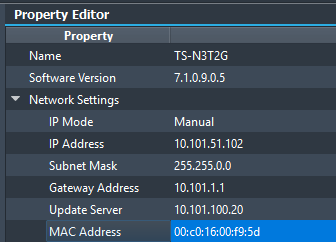
Most ETC devices will report their MAC addresses in Concert. Follow the instructions in the Net3 Concert User Guide to connect to your devices, then select the device you want to identify and locate its MAC address in Property Editor > Network Settings (exact location may differ by device).
ARP table
If the device can't be discovered in Concert, or doesn't display a MAC address there, you can look up the MAC address using this method.
- Verify that the computer can see the device by sending a ping. Type the following command into Command Prompt (Windows) or Terminal (macOS):
ping [your device's IP address]- for example, if your device's IP address is 10.101.10.101:
ping 10.101.10.101
- for example, if your device's IP address is 10.101.10.101:
- If you get
Reply from [your device's IP address]..., continue to the next step.- If you get
Reply from [your computer's IP address]: destination host unreachableorRequest timed out, check your network adapter settings and network infrastructure.
- If you get
- Now you can recover the MAC address of the device. Type the following command:
- Windows (Command Prompt):
arp -a [your device's IP address]- for example, if your device's IP address is 10.101.10.101:
arp -a 10.101.10.101
- for example, if your device's IP address is 10.101.10.101:
- macOS (Terminal):
arp [your device's IP address]- for example, if your device's IP address is 10.101.10.101:
arp 10.101.10.101
- for example, if your device's IP address is 10.101.10.101:
- Windows (Command Prompt):
The command will return the device's MAC address.
Network switch MAC address table
If the device is plugged into a managed network switch, you can find the MAC address of the device through the switch's web interface or command-line interface. The exact method to do this varies depending on the type of network switch. In general, you will need to know which port number on the switch the device is plugged into, then check the MAC address associated with that port.
On ETC-supplied Cisco switches, the MAC address table can be found in the web interface at MAC Address Tables > Dynamic Addresses. This displays a list of each port on the switch and the MAC address(es) detected on that port. For example, for port 5 ("GE5"):

If using the command-line interface instead, the corresponding command is show mac address-table dynamic. This returns similar results to the web interface. For example, for port 6 ("gi6"):

Next Steps
Once you have found the device's MAC address from one of the above methods, contact ETC Technical Services to request a serial number lookup from that MAC address.