
Map a widget, ETCnomad key, or ETC Gadget II in Hog 5 OS
Description
Use the steps below to map a Widget, Super Widget, Super Duper Widget, ETCnomad key, or an ETC Gadget II to a universe in Hog 5 OS. This is commonly used to unlock universes in Hog 5 PC. Widgets and ETCnomad Keys & Gadget IIs can also be used with consoles to get more DMX ports out of the console.
Connecting Widgets and ETCnomad Keys to consoles does not "unlock" more universes. Click here to see how many universes a console can control.

These steps also apply to mapping the Gig Hog, NanoHog, and Hoglet's DMX ports.
v5.0.0
- Launch the show
- Go into the Network window
[ SETUP ] ( Network ) - Go into the Processor Settings
- Right click on the Processor
- Click on Settings
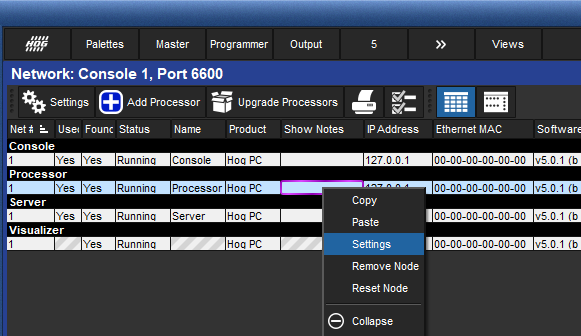
- Go to the Output tab
- Press Add Mapping
- Choose the universes and output type you want

- Widget → Gadget II outputs, Console outputs, and Widget Outputs
- ArtNet and sACN options are for mapping those protocols.
- Click on OK to close the window and apply the settings
Related Links/References