
How To Initialize Flash on Legacy Unison Processor (CMEd, CME, CMEi)
Initializing Flash on Legacy Unison Processors
Initializing flash completely wipes the flash memory on a Legacy Unison Processor (CMEd, CME, CMEi) and can be used as a troubleshooting step if the processor is failing to load or hold onto an architectural configuration. Only perform this process if you have a known good configuration file saved to a floppy disk onsite to load once the processor has been wiped.
Steps
- REMOVE ANY FLOPPY DISK FROM THE PROCESSOR'S FLOPPY DRIVE
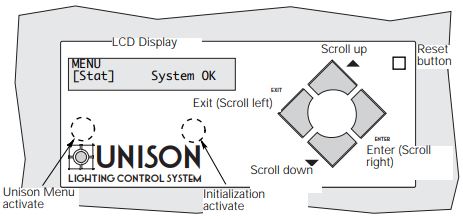
- Press and hold the hidden 'Unison Menu Activate' button under the screen until it says Menu [Stat]
- Tap the Down arrow button until the screen says Menu [Arch], then tap Enter
- Use the up or down arrow buttons to navigate to [Diagnostics], then tap Enter
- Navigate to [Initialize Flash], then tap Enter
- There is no confirmation to proceed. Once Enter is pressed you have passed the point of no return.
- Once the screen says 'Internal flash formatted press enter', tap the RESET button once
- After the Processor reboots and says 'System Okay' (or it may say Dimmer Errors), repeat steps 2-6 to initialize flash one more time.
- Insert the floppy disk and load the architectural configuration